

Tagging options are available from the Tag Type pop down menu and users are able to add a Unit Prefix for Seed Mix area (not available when selecting the Type Mark Tag option).
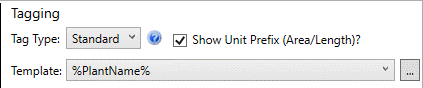
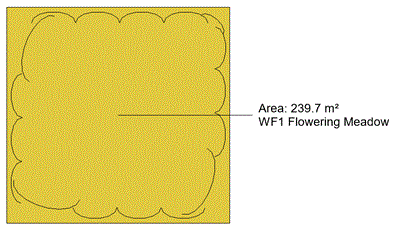
A Standard Tag is based on the Template selected from the drop down list and users are able to create their own templates using the browse (...) control. Templates are created using a combination of selectable parameters [enclosed in parentheses (%)] and free text. A suggested Standard Tag for Seed Mixes is %PlantName% or %Abbreviation%. Note that 'Plant Name' will display the Seed Mix Name. [The expression %Quantity% applies specifically to planting where centres or densities have been specified and is not applicable for Seed Mixes]..
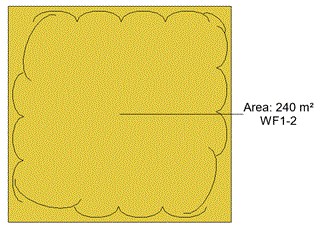
A Compact Tag displays the Plant Code (type parameter) with an instance count suffix (e.g. -2, if it is the second time the plant or mix has been placed in the model).
This option assumes a PlantCode has been assigned for the associated plant or mix: only an instance count is displayed if a PlantCode has not been assigned to the selected plant species/variety (type).
Users are able to retrospectively assign PlantCodes using the Edit Planting tools or the more spohisticated Plant Browser tool that enables modifications of both planting Type and Instance parameters.
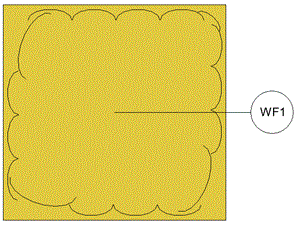
A Type Mark displays the Seed Mix without an instance count and is enclosed within a circle.
This option assumes a PlantCode has been assigned for the associated Seed Mix.
Users are able to retrospectively assign PlantCodes using the Edit Planting tools or the more spohisticated Plant Browser tool that enables modifications of both planting Type and Instance parameters .