

Purpose
To dsiplay records in a schedule that only include Seed Mixes.
Usage
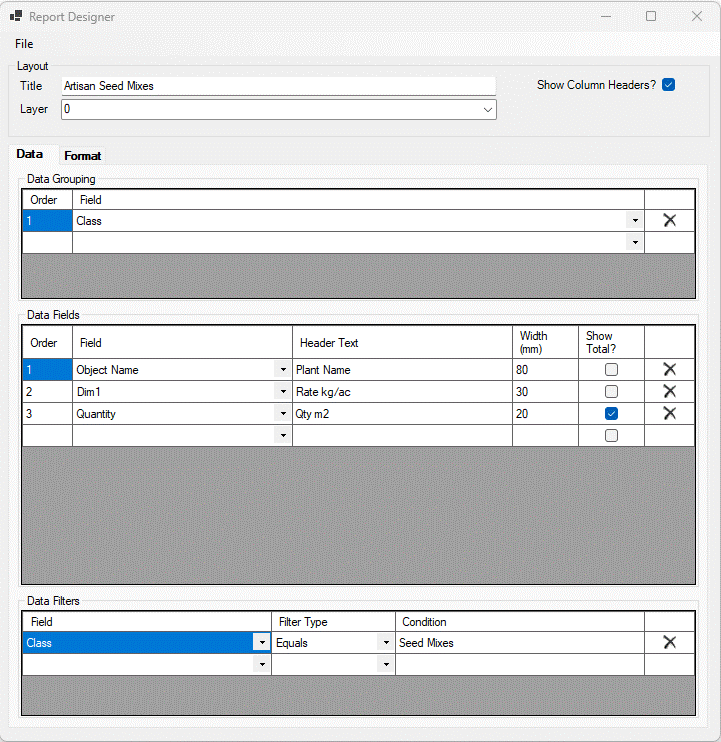
Local Report Templates editing is accessed from the Local Report Templates tab of the Preferences dialog. The example below shows the settings for a Seed Mixes schedule to display information by Seed Mix name, Application Rate and Quantity. [The 'Application Rate' has been defined using the 'Dim1' field].
The example below shows the settings for a Seed Mixes schedule to display information by Seed Mix name, Supplier, Application Rate and Quantity. [The 'Supplier' has been defined using the 'Data1) field and the 'Application Rate' has been defined using the 'Dim1' field].
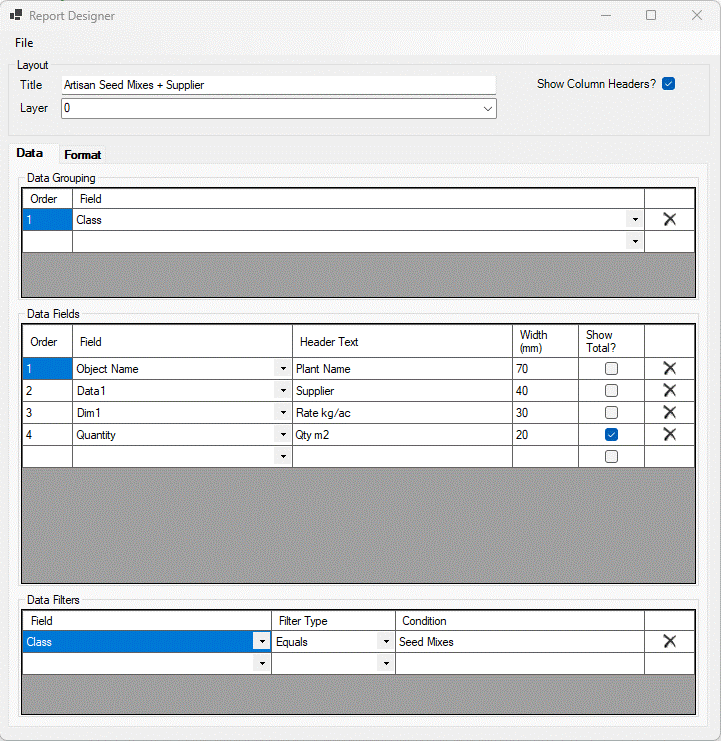
To display Seed Mixes only in a schedule, ensure that Data Filiters includes the entry Class - Equals - Seed Mixes (see Edit Seed Mix Palette).
In the template above, the User Data Field 1 (Dim1) has been used to record the Application Rate for Seed Mixes, so this field is used in the Seed Mixes schedule.
Layout

The layout section of the dialog affects certain overall features of the report.
Title - The default title used when placing the report. This can be overriden when placing the report. See the Insert Report command.
Layer - The CAD system layer that the report is placed on.
Show Column Headers - If ticked the report will have headers for each field (column).
The main section of the Report Designer dialog is divided into 2 tabbed areas...
File

The file menu allows the edited report to be saved.
Save - Save the report to its source. If the edit has been initiated from the preference file then the report will be saved back to the preference file. If the edit has been initiated from an existing report then the existing report will be edited.
Save to File - Save the report to an Xml file. The file can then be used in another drawing, on another machine as needed.
Close - Close the edited report without saving.
Links