|
The Refresh Planting tools are used to update
planting elements within a Revit model after changes have been made to planting
data, symbols, settings or project content. These tools help ensure that
planting graphics, schedules, quantities and associated information remain
accurate and coordinated throughout the project. Refreshing planting can be
particularly useful after importing updates, modifying planting specifications,
or making changes that need to be applied consistently across existing planting
instances.
Command
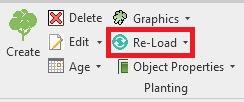
Re-Load Planting is available from the Planting
panel.
Purpose
To enable Planting Families loaded into
existing projects to
be
updated with the most current planting families created by
CSD.
Usage
Planting Families can be Re-Loaded across all
planting,
by Planting Area, By Linear Item or by Singular
Item.
Re-Plant Area
Item
Re-Plant Linear
Item
Re-Plant Singular
Item
Re-Associate
Orphaned Planting
| 


