

The Data ribbon panel provides access to the Artisan data libraries, enabling users to quickly insert pre-configured design content directly into their drawings. These libraries contain commonly used symbols and details that help streamline the drafting process, improve consistency, and reduce the time required to create and annotate landscape design plans.
From the Data panel, users can insert items from the Artisan Symbol Library and Artisan Detail Library, giving immediate access to standard design elements and construction details. All inserted data is controlled by the current Data Insertion Options, allowing placement settings to be configured to suit project requirements.
This section explains the commands available within the Data panel and how they can be used to efficiently add library-based content to your AutoCAD or BricsCAD drawings .
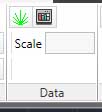
The Data ribbon panel gives access to the commands that place data from the Artisan data libraries.
| Insert Symbol | Insert a symbol into the drawing from the Artisan Symbol Library |
| Insert Detail | Insert a detail into the drawing from the Artisan Detail Library |
All data placement is affected by the current Data Insertion Options
Links