

Planting Parameters
Specification information is displayed depending on the plant type selected with common fields including Centres, Height/Spread, Root, Container Size. Other values such as Girth, Age, Clear Stem Height, may be displayed depending on the selected plant type.
Edit Root, Container Size, Centres, Age, Height/Spread values as required. CS ArtisanRV includes a utility to convert standard planting age and condition conventions into a modelling age used for visualisation and Grow routines : the calculated model age is displayed in the greyed out in the adjoining box.

A percentage value is displayed if the plant record is part of a mix.
Edit values as required.
Note that Model Height/Spread values are displayed but are not editable.
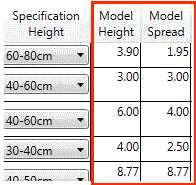
These values are calculated based on the specification parameters and the ultimate height/spread values at the defined 'growth' of the selected planting. Ultimate Height/Spread values can be edited from the By Planting By Year option from Age Planting which will result in a recalcualtion of the Model Height/Spread values displayed in the Edit Planting dialog.
Planting Centres and Densities
Planting quantitites for Area Planting and Linear Planting, are calculated based on the associated area or length and the defined centres (spacing) value or density (number of plants per area or per area squared).
Plant Spacings can
be specified by either Centres or Density and entering a value in either
box will automatically override the corresponding one. The calculations
between density and centres values are based on the following
formulae...
Density (Area) = 1
/ (Centre Distance Squared)
Density (Length) =
1 / (Centre Distance)
If a user has
initially defined a 'Centres' value when creating a palette or subsequently
when editing a label, the 'calculated' density value may not be a whole number
if the user decides to display this subsequently in a label or schedule.
By way of example,
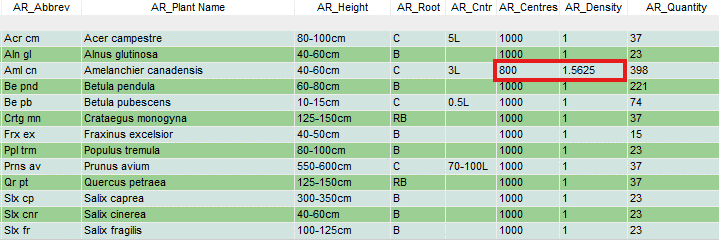
if a 'Centres' value of 0.800m (800mm) is defined, the corresponding 'Density'
value will be 1.5625 (i.e. 1.56 plants per m2).

A schedule of the above planting with both the Centres (AR_Centres) and Density (AR_Density) fields selected would display the corresponding calculated value...
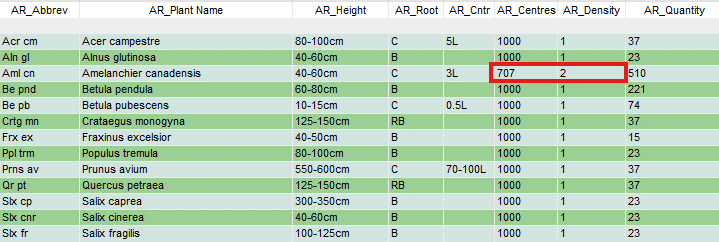
If users are wanting to specify a ‘whole number’ for planting density (standard practice), this can be set when the palette is originally created and planting is placed or subsequently using the Edit Planting tools. Set the Density as required (e.g. 2 plants per m2) and the values are adjusted accordingly in associated schedules.
If planting is
placed from a palette where planting rates were specified as 'Centres' and then
subsequently a decision has been made to display Densities, the resultant
Density value is calculated accurately based on the specified Centres value. If
values are not as anticipated, users should use the Edit Planting
or the Plant Explorer tools to modify values as required.