

Plant Spacings
Plant Spacings values are used to
calculate planting numbers for Area Planting and Linear Planting. If values are
displayed for single plant labels, plant quantities in labels and schedules
(reports) are based on the number of items individual plant components
selected.

Plant Spacings can be specified by either Centres or Density and entering a value in either box will automatically override the corresponding one. The calculations between density and centres values are based on the following formulae...
Density (Area) = 1 / (Centre Distance Squared)
Density (Length) = 1 / (Centre Distance)
If a user has initially defined a 'Centres' value when creating a palette or subsequently when editing a label, the 'calculated' density value may not be a whole number if the user decides to display this subsequnetly in a label or schedule.
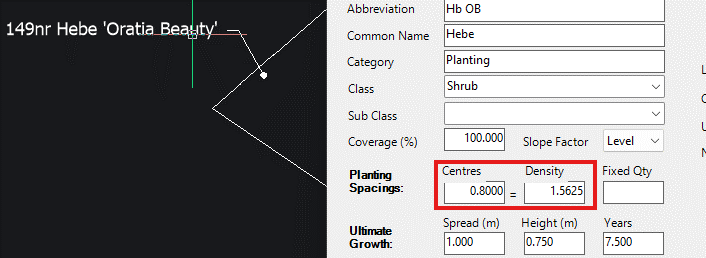
By way of example, if a 'Centres' value of 0.800m (800mm) is defined, the corresponding 'Density' value will be 1.5625 (i.e. 1.56 plants per m2).
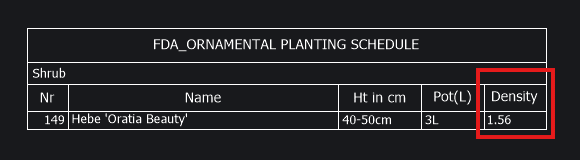
A schedule (report) of the above planting with 'Density' selected would display the corresponding calculated value...
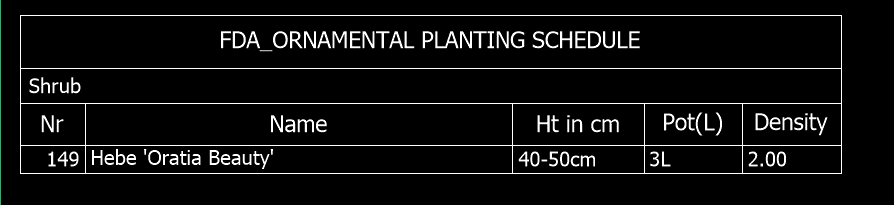
Users may want to change values using Edit Planting tools or Plant Browser to ensure 'Density' is represented as a whole number (e.g. 2 plants per m2).
If planting
is placed from a palette where planting rates were specified
as 'Centres' and then subsequently a decision has been made to display
Densities, the resultant Density value is calculated accurately based on the specified Centres
value. If values are not as anticipated, users should use the Edit Planting or the Plant Explorer
tools to modify values as required.