The Planting Browser provides a centralised environment for reviewing, managing, and editing planting information within an Artisan drawing. Designed to give users a comprehensive overview of all planting content in the current model, it enables rapid navigation, selection, and modification of planting objects from a single interface.
The browser displays planting elements in a structured explorer view, allowing users to organise and examine content by entity type, plant type, location, and individual instances. An associated graphical plan view highlights selected items within the drawing, making it easy to locate, review, and verify planting information visually.
Using the Planting Browser, users can efficiently manage large and complex planting schemes by filtering records, viewing detailed plant information, identifying specific planting groups, and performing actions across multiple objects simultaneously. Common tasks such as editing planting data, substituting species, deleting planting, and reviewing plant characteristics can all be performed directly from the browser interface.
In addition to viewing all planting content within a drawing, users can also work with a selected subset of planting elements, enabling focused editing of specific areas or project phases. This flexibility makes the Planting Browser an effective tool for coordinating planting information, maintaining design accuracy, and managing revisions throughout the lifecycle of a landscape project.
This section explains the Planting Browser tools and workflows, including browsing planting content, filtering records, viewing plant information, and managing planting data within Artisan.
Command
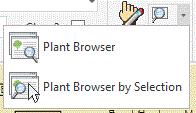
Plant Browser is available from the Reports panel.

Purpose
To provide a centralised tool to view and manage Artisan Objects in the current CAD model.
Usage
There are two options available under the Plant Browser menu...