

The Auto Update Service has been created to make it easier for users to access the latest builds and features without the need for manually checking, downloading and installing. Once installed, the CSD Buddy App will monitor your installed CSD products and notify you of any available updates, which then can be run automatically without the need for separate downloads and installations. You can run the Auto Update Service at any time by Right mouse clicking the CS Buddy App icon from the Windows taskbar and selecting “Check for Updates”.
The Auto Update Service manages all CloudScapes products including CS ArtisanRV (Revit), CS ArtisanAC (AutoCAD), CS ArtisanBC (BricsCAD) and also the CS Buddy App itself.
Ensure you are operating the most up to date version of your software by right-clicking the Buddy App icon in the taskbar and selecting “Check for Updates”.
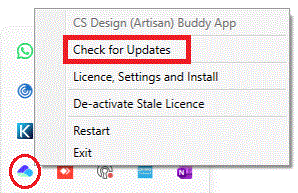
Note that the Buddy App needs to be operational for
licensing and needs to be installed initially with full administrator
privileges. There is no requirement for users to manually download or
install updates as the CSD Auto Update service is designed to handle this
service in the background using pre-authorisation.
Full read/write access is required to C:\Artisan Documents, where user-defined Artisan settings files and palettes are stored.
Pick Check for Updates to run the service. The system checks to see if there are any updates available for all CloudScapes products installed on the current machine. If the ,ost current version has been installed, the message 'No Updates Required' is displayed.
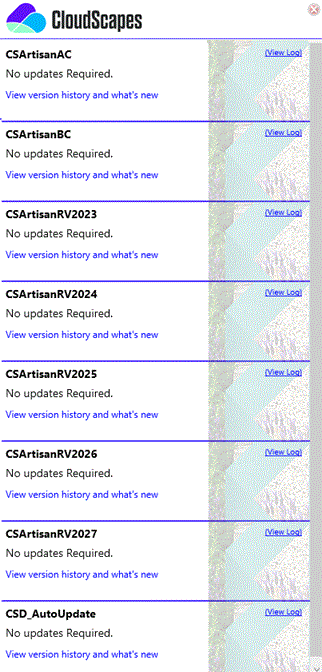
Note that if a newer version of the Auto Update Service itself is installed, it is recommended that users run the Restart command from the CS Buddy App menu, to ensure that this latest version is operational. After installing the latest version of the CS Buddy App (Auto Update Service), it is recommended that users run Check for Updates again as some new services may be available (particularly new major Revit releases from Autodesk).