

The CloudScapes Knowledgebase provides a central repository of technical guidance, troubleshooting information, best-practice advice, and solutions to previously reported support issues. Before raising a new support request, users are encouraged to search the Knowledgebase, as an existing article may already provide an immediate answer to their question.
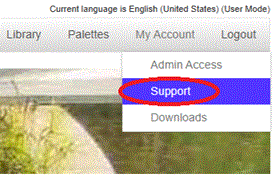
Access to the Knowledgebase is available through the Support option within the My Account menu after logging into the CS Web App.
Once opened, users can search the Knowledgebase using a combination of:
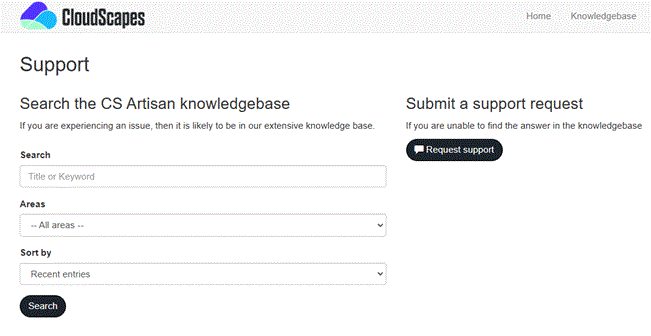
These search facilities make it easy to locate information relating to specific tools, workflows, installation issues, licensing questions, BIM coordination topics, and general product usage.
Search results are displayed as a list of matching Knowledgebase articles and support solutions.
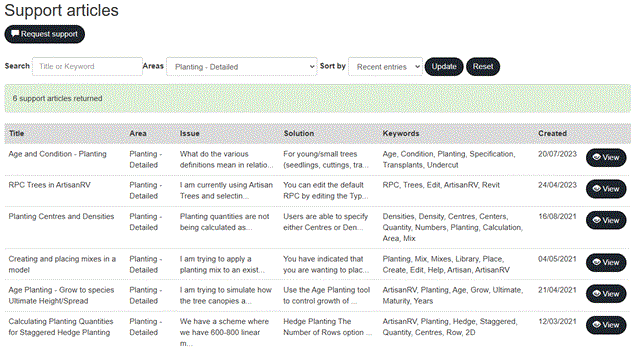
For each result, summary information is presented to help identify the most relevant article, including details such as:
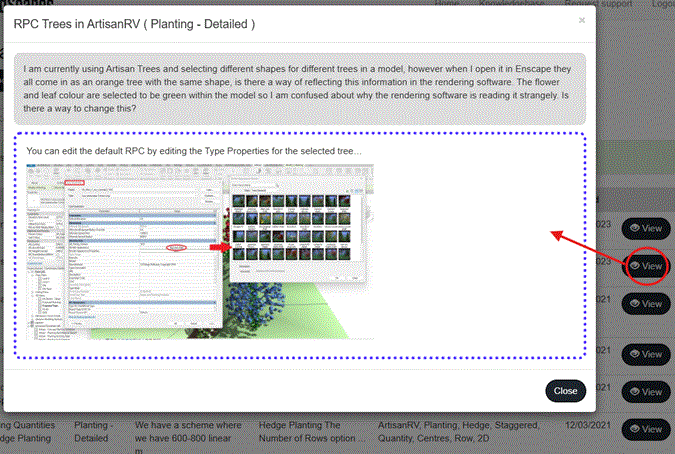
Selecting View opens the full Knowledgebase article, allowing users to review detailed guidance, step-by-step instructions, screenshots, troubleshooting procedures, and related information where available.
The Knowledgebase is continually expanded as new features are released, common support enquiries are resolved, and best-practice guidance is developed.
Published content may include:
Regularly searching the Knowledgebase can often provide the fastest route to resolving an issue or learning about new functionality.
If a suitable article cannot be found, users can create a new support request directly from the Knowledgebase environment.
Submitted requests are recorded within the CloudScapes support system, allowing users to:
This integrated approach ensures that users have access to both self-service resources and direct assistance from the CloudScapes support team when required.
The Knowledgebase should be considered the first point of reference for product information and support, providing a constantly growing source of expertise developed from real-world project experience and user enquiries.