

The CS ArtisanRV Digital Help System provides comprehensive guidance for all major tools, commands, workflows, and features within the software. Designed as a continuously maintained cloud-based resource, the Help System can be accessed directly from within CS ArtisanRV or through a standard web browser, ensuring users always have access to the latest documentation.
Unlike traditional static help files, the Digital Help System is updated regularly to reflect new functionality, workflow enhancements, software releases, and best-practice guidance. This ensures that the information available to users remains aligned with the current version of CS ArtisanRV and associated CloudScapes services.
The Help System is fully integrated with the application and includes context-sensitive assistance, enabling users to quickly locate relevant guidance while working. Whether you are learning a new feature, troubleshooting a workflow, or seeking detailed technical information, the Digital Help System provides a central knowledge resource to support your work.
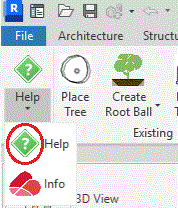
The Digital Help System can be opened directly from the CS ArtisanRV
Ribbon. Alternatively, the Help System may be accessed through any supported web
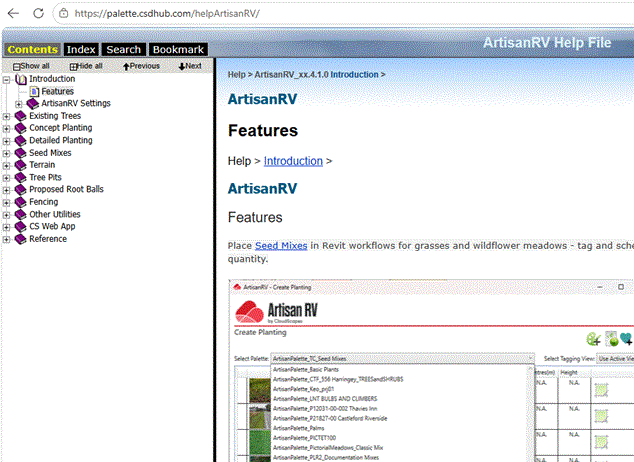
browser using the ArtisanRV Help Portal link. When opened, the Help System displays the Contents page,
providing access to all major subject areas and feature categories within CS
ArtisanRV. The Contents tab presents all available topics within a
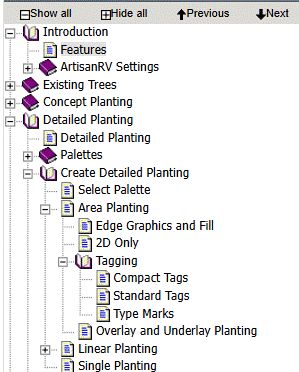
structured navigation panel located on the left-hand side of the display. By default, topic areas are presented in a simple hierarchical structure.
Selecting a category expands the topic tree, revealing related sub-topics and
detailed workflow guidance. This structure allows users to browse documentation logically, progressing
from high-level feature categories through to specific commands and
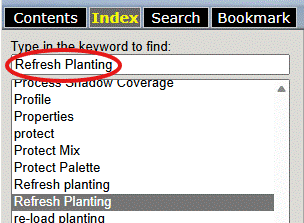
settings. The Index tab provides an alphabetical list of keywords and
subjects referenced throughout the Help System. To locate information: The Index is particularly useful when users already know the name of a
command, tool, or feature and want to access the relevant documentation
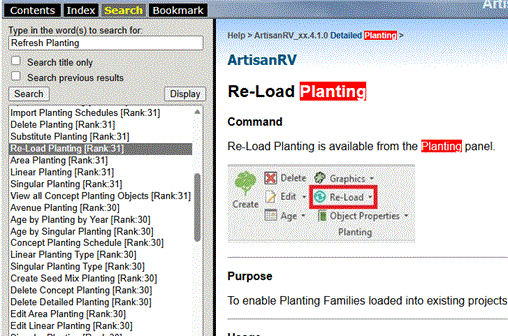
directly. The Search tab enables full-text searching across the entire
Help System. To search for information: Words matching the search criteria are highlighted within the displayed
topic, allowing relevant information to be identified quickly. Search provides the fastest way to locate information when the exact location
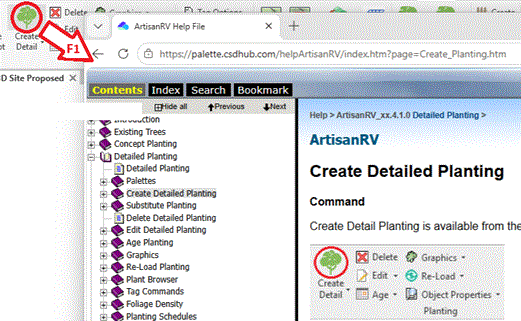
of a topic is unknown. The CS ArtisanRV Digital Help System includes context-sensitive
help, providing direct access to relevant documentation from within the
application. When working in CS ArtisanRV: The Help System will automatically open the topic associated with the
selected command, allowing users to access guidance without manually searching
the documentation. This feature provides immediate assistance while working and helps users
become familiar with new tools and workflows more efficiently. Because the Digital Help System is hosted as a cloud-based resource,
documentation can be updated independently of software releases. This enables
CloudScapes to publish: Users therefore benefit from a continually evolving knowledge resource that
supports both new and experienced CS ArtisanRV users. The CS ArtisanRV Digital Help System is intended to be your
primary source of product information, providing quick access to the guidance,
reference material, and workflow documentation needed to work effectively within
the
software.
Accessing the Help System
Navigating Help Topics
Using the Index
Searching the Help System
Context-Sensitive Help
Keeping Documentation Current