

Alter the local report templates
Usage
Report Settings are accessed from the Local Report Templates tab of the Preferences dialog.
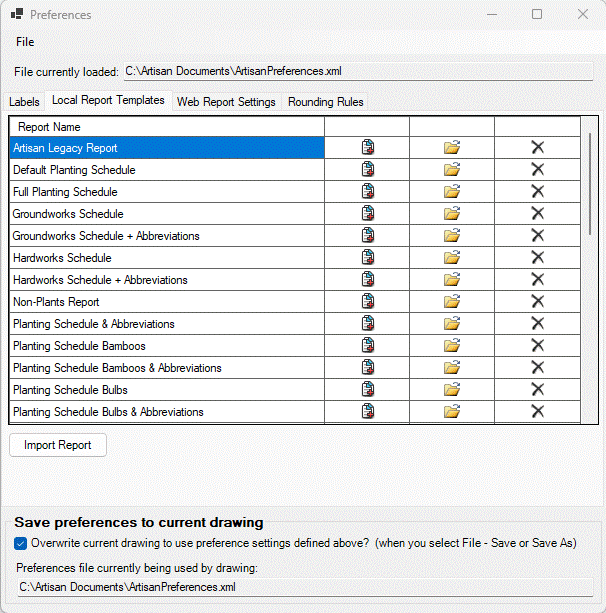
Copy Existing Report Template
Click the  button next to an existing
report template to create a copy of the selected template that is listed at
the bottom of the list.
button next to an existing
report template to create a copy of the selected template that is listed at
the bottom of the list.

Select the Edit option to rename the copied Report template and to amend as required.
Edit Existing Report Template
Click the  button next to an existing
report template to edit it.
button next to an existing
report template to edit it.
The Local Report Template dialog will open. See the Preferences - Local Report Template Editing page for more detail on how to edit a template.
Delete Exisiting Report Template
Click the  button next to an existing
report template to delete it from the list.
button next to an existing
report template to delete it from the list.
Adding New Report Template
Type the name of a new template in the clear row at the
bottom of the list. Then click the button next to the new name
to enter details. See the Preferences - Local Report Template Editing page for
more detail on how to edit a template.
Import Report
Click the Import Report button and a dialog will allow an XML file containing a report template to be selected. The imported report will be added to the available report templates.
Links