

The Miscellaneous ribbon panel contains a collection of utility and maintenance tools designed to assist with drawing management, data validation, and project administration. These commands complement the core Artisan workflows by providing functions that help maintain drawing integrity, manage Artisan data, update project information, and perform various supporting tasks.
Many of the tools found within this section are used to review, recalculate, repair, or manage information stored within an Artisan drawing. They help ensure that labels, reports, and other intelligent Artisan objects remain accurate and up to date throughout the design process.
The topics in this section explain the purpose and operation of each miscellaneous command, providing guidance on when and how to use these tools effectively. Whether maintaining project data, resolving drawing issues, or updating existing information, the Miscellaneous commands provide essential support functions for everyday Artisan workflows.
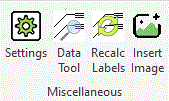
The Miscellaneous ribbon panel gives access to commands not found in the other ribbon panels.
| Settings | Change Artisan settings that affect this computer only |
| Data Tool | Check and remove Artisan data from the drawing |
| Recalculate Labels | Recalculate labels according to current rounding rules |
| Insert Image | Insert an image into the drawing from a palette |